Our first assignment this semester will be 100% on photoshop basis. We need to manipulate a picture following the theme; 'who I am?'. So for this assignment I decided that I want to be a zombie that'll infect other people in life. So here's how it goes on

1) I choose to the image of this zombie found on google to be the base for the body of the zombie.


2) Then I masked the face area and and paste my face on it. Later on, I attached the background picture that I'd taken myself around Cyberjaya.


3) 4) Later on I overlay 2 more background obtained from the web to overlay the original background.
                                                 

4) Later on, I added skin peeling texture and blend it using blending tool. I also used dodge and burn tool and overlay it to make the effect more interesting.


6) To make it more dramatic, I overlay with colour burn and here's the Final result


As we grow up, pimples, blemish and many otther unwanted scrap slam into our face thus turns on insecurity in most of us. Photoshop has been used for more than a decade to overcome this matter especially in commercial advertising. So for today I did the same for my face.

Technique that's used includes smoothing, patching (spot healing) and blurring. To smoothen and adjustig the clarity of the picture, I used up camera RAW filter that can be find under FILTER in the menu bar. 

camera RAW filter

RESULT!
For the second week of this semester, we were exposed on how to apply layer mask to do proper cut and paste procedure without damaging the original source image. so here's the initial image:


FINAL RESULT


For the first ever week, we are asked to draw a pixelated apple. Pixelated apple drawing represent Bitmap images that's pixel and resolution based. 
vectorise apple

pixelated apple drawing


Hello there, It's been a while since I last updated my blog. For the last few weeks it has been quite a busy week for us. A lot of submission and stuff to get done with. Anyway here's some 'brief' on my second assignment.

As we are all covered up on Adobe Illustrator, now we moved on to InDesign. We are assigned to to a poster for our mural assignment. This time, I experimented with Adobe InDesign. In which I found that it is hard to used to it. It requires a lot of tutorial videos and reading. You'll need a lot of patience at first but when you've mastered it up, you can open up a publishing firm and get rich.

Anyway, I'm sorry that I can't show the initial sketch because I lost it :(
Moving on, here's the look of the follow up design after it.

the first design

So Madam gave me an opportunity to fix here and there of the poster as this is clearly not up to the professional standard as well. Anyways after a consultation with Madam Ling, I came out and finally submitted this:

 
For today lecture, we are asked to go out, explore natural, synthetic or anything that have texture then make a composition based on it. here's the snapshot of it taken from facebook.


After lecture finished, In a group we went out for about half an hour to search for some texture and we made out our artistic composition using it.

our texture composition


Printing is a process of reproducing text or an images using a template medium. The earliest printing method were founded back in 220 a.d in China which uses wooden block. Today there are many form of printing method made available and they can be print on                                        

GRAVURE PRINTING

http://www.printoutlet.us/

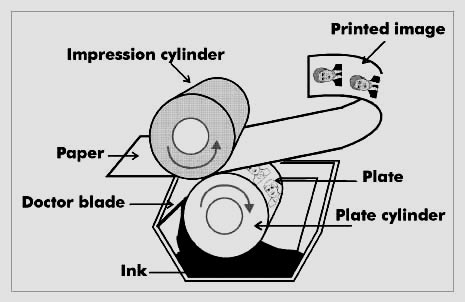
Rotogravure (roto or gravure for short) is a type of intaglio printing process, which involves engraving the image onto an image carrier. In gravure printing, the image is engraved onto a cylinder because, like offset printing and flexography, it uses a rotary printing press


OFFSET PRINTING

directindustry.com

Offset printing is a commonly used technique in which the inked image is transferred (or “offset”) from a plate to a rubber blanket, then to the printing surface.


FLEXOGRAPHY


http://www.inmelimitedonlinestore.com/
Flexography is a form of printing process which utilizes a flexible relief plate. It is essentially a modern version of letterpress which can be used for printing on almost any type of substrate, including plastic, metallic films, cellophane, and paper.


DIGITAL PRINTING


www.adamsprinters.co.uk

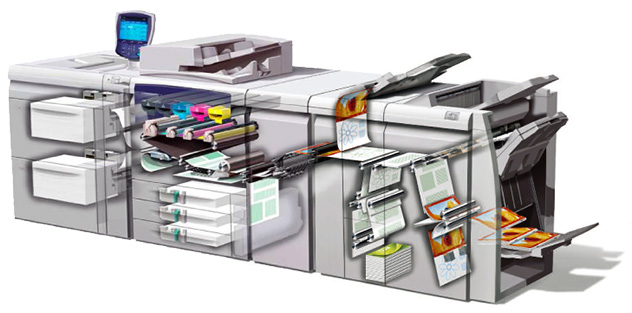
Digital printing refers to methods of printing from a digital-based image directly to a variety of media. It usually refers to professional printing where small-run jobs from desktop publishing and other digital sources are printed using large-format and/or high-volume laser or inkjet printers.

LASER PRINTER

https://itsjacqueline.files.wordpress.com/2011/04/laser-printers.jpg

laser printer is a popular type of personal computer printer that uses a non-impact (keys don't strike the paper), photocopier technology. When a document is sent to the printer, a laser beam "draws" the document on a selenium-coated drum using electrical charges.


As the sketch got it approval, I moved on into the best part. Designing the mural inside Adobe Illustrator. I started off with some reference to get to the point.


this is the original sketch


the colours!

and here's the progression after that. It took a couple of hours to built all of the trapezoids. And the best part, I forgot to save it before i quit illustrator. The morning after that sleepless night, All gone. So I need to re do it again. But it pays off as Madam Ling gave me A+


In progress


TADAAA! 

Gestalt is a psychology term which means "unified whole". It refers to theories of visual perception developed by German psychologists in the 1920s. 

These theories attempt to describe how people tend to organize visual elements into groups or unified wholes when certain principles are applied. Gestalt means when parts identified individually have different characteristics to the whole (Gestalt means "organised whole")

e.g. describing a tree - it's parts are trunk, branches, leaves, perhaps blossoms or fruit
But when you look at an entire tree, you are not conscious of the parts, you are aware of the overall object - the tree.

Parts are of secondary importance even though they can be clearly seen.

Here's some example of it: 

source: https://kristenmarieschneider.wordpress.com

For our vey own first assignment, we are assigned to design a mural dedicated to the handicapped student. The reason behind this idea is because we felt that they don't receive much attention and lack of motivation. To kick in the spirit, we proposed our mural design.

Following the designer principal, first thing I did is the initial sketch and it get rejected.


first design
Madam Ling said that the design shows no creativity at all. But I can say that it's kinda cute in some other perspective. So then I came out with another sketch. And guess what?

second sketch accepted!


So here comes the best part that I've been waiting for. Pen Tool! Trust me, Ive been procrastinating a lot before this for not knowing how to use it. Anyway, this week tutorial, we've been thought on how ho to use pen tool and make lines of our face.
This 'Pen Tool'

Pen tool is used to create path and... well it's magical as you can do anything with to create anything you want on Adobe Illustrator.

so here's the original picture


and here's the result after a linework on it!

Hello and welcome back to my humble space. To clarify the the above title, I'm going to give a brief entry on what I learned in my second week of Ms. Ling's class.

MMU FCM's lab

  So for our first lecture session this week, we are separated into groups. Then we need to deliver a mind map of a key process in design. Here's our mind map :-

a MUST FOLLOW key process!

  Moving on to the tutorial session a day after, Ms. Ling thought us a basic hands on of the Adobe Illustrator. Although she just showing us around the software, my curiosity goddess inside of me really kicked in. I never used Adobe Illustrator before although I'd installed it earlier as it comes in bundle with Adobe Creative Cloud's plan. Then we are asked to vectorise our own profile pic's.
It's kinda hard to explain everything in a shot as it doesn't come in handy at first. But finally I got my job done at last. 


TADAAA


As for our first assignment, we are asked to identify vector graphics around us, therefore before I starts with it I wanted to clarify the definition of it. Here's something to help you understand;

vector graphics
Vector graphics are created in graphics packages and consist of shapes called objects. It is possible to edit each object separately, for example, change the shape, colour, size and position. Even if an object in a vector graphic is quite large, it doesn't need a lot of computer memory. Therefore the file size of a vector graphic is often very smallVector graphics are scalable, when you resize them, they do not lose quality like raster graphics.

example of vector graphics; (sourced from google images)


RASTER GRAPHICS
Pictures found on the Web and photos you import from your digital camera are raster graphics. They are made up of grid of pixels, commonly referred to as a bitmap. The larger the image, the more disk space the image file will take up. Raster graphics are digital images created or captured (for example, by scanning in a photo) as a set of samples of a given space. A raster is a grid of x and y coordinates on a display space. (And for three-dimensional images, a z coordinate.) A raster image file identifies which of these coordinates to illuminate in monochrome or color values. The raster file is sometimes referred to as a bitmap because it contains information that is directly mapped to the display grid.

example of raster graphics ; (sourced from google images) 


AND HERE'S SOME VECTOR IMAGES I'D IDENTIFIED:


sources from:
http://www.bbc.co.uk/schools/gcsebitesize/dida/graphics/bitmapvectorrev2.shtml
http://whatis.techtarget.com/definition/raster-graphics
http://techterms.com/definition/rastergraphic


 As I've been mentioning in above title, I clearly stated that I'm not gifted with writing skill. Anyway, since I'm eager and too ambitious, I will try my very best to share some bits and bytes of what I learnt from my wonderful computer graphic lecturer, Ms. Ling and a twist of my personal life event that are more or less interesting.

  First of all, I'm not going to share my details here in the main page as I've created another page for that and you can find it on the menu tab above or simply click here. Moving on, as a fellow MMU's student, I can say this university life has been amazing so far. It brings me into a whole new experience as i never being away from my family for 18 years long. Therefore I wish to start anew and burst into joy everyday here in MMU. I mean hello, obviously I can't just sit down and lay back everyday at home, keep on procrastinating and live in the past like what i did for almost 6 month after I finished my SPM paper. 

  For starter, I want to show you guys how my hostel room in MMU looks like, here it is;

the view


study desk

bed ( I got the upper bunk, can be very hot at times especially during night )

In August, we'll be moving to the new refurbished hostel block. Hopefully my roommates wouldn't change as I'm very comfortable with my fellow roommates, Anas and Syed. They are super friendly and brotherly like to me as I'm the youngest among them. I'm lucky to have them as my companion at time.


Powered by Blogger.